The FIFA World Cup 2026 is shaping up to be the biggest sporting event in history — three host nations (USA, Canada, and Mexico), 48 teams, and 104 matches. I’m already buzzing about it. But here’s the frustrating part: depending on where you live, a lot of the best streams are going to be geo-locked. You might get a blacked-out match or a paid-wall broadcaster that doesn’t serve your country.
That’s exactly where a VPN comes in. With the right setup, you can watch FIFA World Cup 2026 with a VPN from literally anywhere — whether you’re at home, traveling abroad, or living somewhere with limited sports coverage. In this guide, I’ll walk you through everything you need to know, step by step.
What Is a VPN and Why Do You Need One for World Cup 2026?
A VPN (Virtual Private Network) does two main things: it encrypts your internet traffic and it hides your real location by routing your connection through a server in another country. So if a streaming service thinks you’re in the US, you get access to US-only content — even if you’re sitting in a café in Bangkok.
For the World Cup, this is huge. Free or cheap official broadcasters differ wildly by country. For example:
- UK residents can watch on BBC iPlayer and ITV — both completely free.
- US viewers can stream on Fubo, Fox Sports, and Telemundo.
- Australian fans can catch matches on SBS On Demand (free) or Optus Sport.
If you’re outside these regions, a VPN lets you connect to a server in that country and unlock the stream. Smart, right?
Is It Legal to Use a VPN for Streaming the World Cup?
Short answer: using a VPN is legal in most countries. You’re not hacking anything — you’re just changing your apparent location. However, it may technically violate the terms of service of some streaming platforms.
That said, millions of people do it every day without issues. The services rarely ban individual users for this. Just be aware that if your VPN connection drops mid-match, the stream might cut out — which is why picking a reliable VPN matters (more on that below).
I’d always recommend checking the rules in your specific country, especially if you’re in a place like China, Russia, or the UAE, where VPN laws are stricter.
Best Free Broadcasters to Unlock with a VPN
Here’s the exciting bit — you don’t have to pay a penny for a subscription if you use the right VPN server location.
| Country | Broadcaster | Cost | Device Support |
|---|---|---|---|
| UK | BBC iPlayer / ITV | Free | Web, iOS, Android, Smart TV |
| Australia | SBS On Demand | Free | Web, iOS, Android |
| Canada | TVA Sports / CTV | Free (partial) | Web, iOS, Android |
| USA | Fox Sports (some) | Partial | Web, iOS, Android |
My personal pick? BBC iPlayer. The picture quality is excellent, the commentary is world-class, and it’s completely free. I’ve used it for the last two World Cups — it never lets me down.
Top 5 VPNs for Streaming FIFA World Cup 2026
Not all VPNs are created equal. A lot of free VPNs are too slow for HD streaming, and some get blocked by major broadcasters. Here are the ones I’d actually recommend:
1. ExpressVPN — Best Overall
ExpressVPN is my go-to for sports streaming. It’s fast enough for 4K streams, has servers in 105 countries, and works reliably with BBC iPlayer, Fubo, and SBS. The MediaStreamer (Smart DNS) feature is a bonus for devices that don’t natively support VPN apps — like older smart TVs.
- Speed: Consistently fast (great for HD/4K)
- Servers: 3,000+ in 105 countries
- Price: From ~$6.67/month (annual plan)
- Works with: BBC iPlayer, Fubo, ITV, SBS, Peacock
2. NordVPN — Best for Security + Speed
NordVPN has become a streaming powerhouse. Their Meshnet and SmartPlay features are specifically designed to bypass geo-restrictions without slowing down your connection. I’ve streamed live matches on NordVPN without a single buffer.
- Speed: Excellent (NordLynx protocol)
- Servers: 6,000+ in 111 countries
- Price: From ~$3.99/month (2-year plan)
- Works with: BBC iPlayer, ITV, SBS On Demand, Fubo
3. Surfshark — Best Budget Option
If you’re watching on a tight budget, Surfshark gives you unlimited simultaneous connections at a fraction of the price. That means your whole family can stream different matches at the same time. The Camouflage Mode is handy in countries that try to block VPN traffic.
- Speed: Very good
- Servers: 3,200+ in 100 countries
- Price: From ~$2.49/month (2-year plan)
- Works with: BBC iPlayer, SBS, ITV
4. CyberGhost — Easiest to Use
CyberGhost has dedicated streaming servers that are specifically optimised for each platform — BBC iPlayer, Amazon, and more. You just select “BBC iPlayer UK” from the list and it connects automatically. Great if you’re not that tech-savvy.
5. Private Internet Access (PIA) — Most Servers
PIA has the largest server network of any VPN on this list. It’s not always the fastest, but the sheer number of servers means you’ll almost always find a reliable connection. Good for power users who want flexibility.
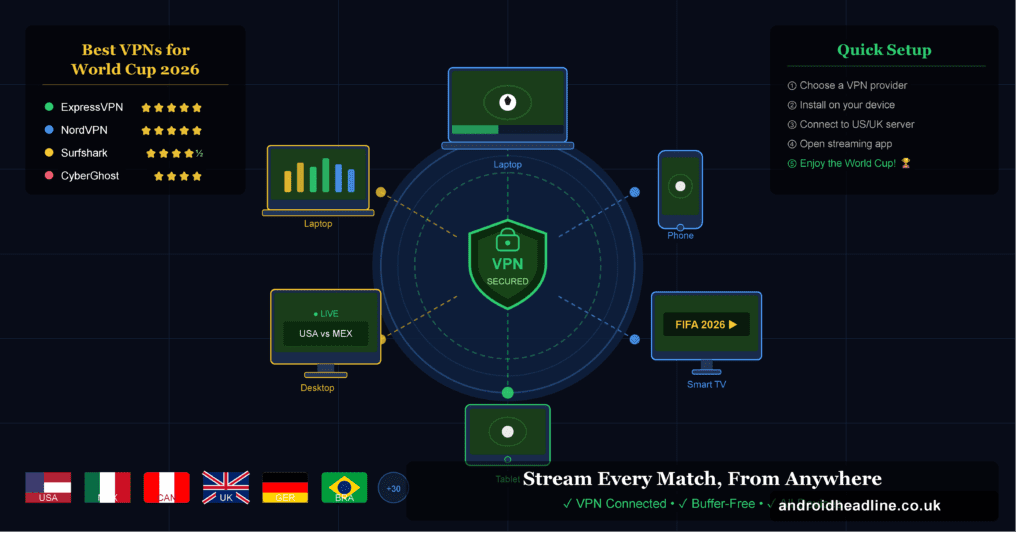
How to Watch FIFA World Cup 2026 with a VPN: Step-by-Step
Ready to set it up? Here’s how to do it in under 10 minutes:
- Choose your VPN. Based on the list above, pick the one that suits your budget and device. ExpressVPN and NordVPN are my top recommendations for most people.
- Download and install the VPN app. Head to the provider’s official website and download the app for your device — Windows, Mac, iOS, Android, Fire TV, or even your router.
- Create an account and log in. This usually takes about 2 minutes.
- Connect to a server in your chosen country. If you want BBC iPlayer, connect to a UK server. For SBS, choose an Australian server. For Fubo or Fox Sports, pick a US server.
- Open your streaming platform of choice. Go to BBC iPlayer (bbc.co.uk/iplayer), SBS On Demand, or whichever service you’ve chosen.
- Create a free account if needed. Some services (like BBC iPlayer) require a free account with a UK postcode. Just use any valid UK postcode — even a generic one like “SW1A 1AA” works fine.
- Find the World Cup match and hit play! You’re all set. Enjoy the beautiful game.
Pro tip: Before matchday, test your VPN connection and make sure the stream loads without buffering. The last thing you want is to troubleshoot a VPN 5 minutes before kick-off.
Which Devices Can You Use a VPN On?
Pretty much all of them. Here’s a quick breakdown:
- Smartphones & tablets — iOS and Android apps available for all major VPNs
- Windows & Mac laptops/desktops — native apps or browser extensions
- Smart TVs — install via app store (Samsung, LG), or use a VPN-enabled router
- Amazon Fire Stick / Fire TV — ExpressVPN and NordVPN both have native Fire TV apps
- Apple TV — use MediaStreamer/Smart DNS or a VPN router
- Gaming consoles (PS5, Xbox) — set up VPN on your router or use Smart DNS
Setting up a VPN on your Wi-Fi router is actually a brilliant move if you have multiple devices. Everyone on your home network gets VPN protection at once.
A Quick Personal Story
I remember the 2022 World Cup in Qatar. I was travelling in Southeast Asia when the knockout rounds started — and I couldn’t access any of the UK streams I usually relied on. I scrambled to set up ExpressVPN on my laptop about an hour before England’s quarter-final. It worked perfectly. HD stream, zero lag, full BBC commentary. From a hotel room in Chiang Mai. That experience completely sold me on the idea, and I’ve kept a VPN subscription ever since.
If you’re planning to travel during the summer of 2026 — or you’re an expat who just wants to watch your home team — this is genuinely one of the best investments you can make.
Troubleshooting: What If the VPN Isn’t Working?
Sometimes streaming platforms detect and block VPN traffic. Here’s what to do:
- Try a different server. Switch to another server in the same country — most VPNs have dozens of options.
- Clear your browser cache. Old cookies can sometimes give away your real location.
- Try a different browser. Chrome and Firefox sometimes behave differently.
- Use the VPN’s dedicated streaming servers. CyberGhost and ExpressVPN have servers specifically optimised for streaming.
- Contact VPN support. The good providers have 24/7 live chat — they’ll point you to a working server for your specific platform.
If none of that works, switch to a different VPN provider. It’s worth having a backup.
FIFA World Cup 2026: Key Facts and Match Schedule
Before we wrap up, here are some quick facts about the tournament:
- Dates: June 11 – July 19, 2026
- Host nations: USA, Canada, Mexico
- Teams: 48 (expanded from 32)
- Matches: 104 total
- Venues: 16 stadiums across 3 countries
The group stage alone will have more matches than any previous World Cup final stage. That’s a lot of football — and a lot of potential streaming sessions. Having a reliable VPN is going to be essential.
According to FIFA’s official press release, the expanded format means more nations and more underdogs will make it to the knockout rounds — making it potentially the most unpredictable World Cup yet. (Source: FIFA.com)
For streaming rights information by country, Tom’s Guide maintains a regularly updated breakdown of which broadcaster holds rights in each region — worth bookmarking.
Final Thoughts
Here’s what it comes down to: the FIFA World Cup 2026 is going to be unmissable, and you deserve to watch every single match — wherever you are in the world. A good VPN removes all the geo-blocking frustration and opens up free, high-quality streams that you’d otherwise be locked out of.
My top picks? ExpressVPN for pure performance, NordVPN for security and speed, and Surfshark if you’re budget-conscious. Any of those three will serve you well across the entire tournament.
Don’t wait until the opening match to set this up. Get your VPN sorted now, test it with a stream, and bookmark this guide so you’re ready when the tournament kicks off.
Frequently Asked Questions (FAQ Schema)
Q: Can I watch the FIFA World Cup 2026 for free with a VPN?
A: Yes! By connecting to a UK or Australian VPN server, you can access free broadcasters like BBC iPlayer and SBS On Demand, which have rights to show World Cup matches at no cost.
Q: Will a free VPN work for streaming the World Cup?
A: Free VPNs are generally not recommended. They’re often too slow for HD streaming, have data limits, and are frequently blocked by major broadcasters. A paid VPN is a much better investment.
Q: Is it safe to use a VPN for streaming?
A: Yes. A reputable paid VPN encrypts your connection and doesn’t log your activity. Just make sure you choose a trustworthy provider with a strict no-logs policy.
Q: What’s the best VPN for BBC iPlayer World Cup streaming?
A: ExpressVPN and NordVPN are consistently the most reliable for BBC iPlayer. They offer UK servers that work well with the platform.
Q: Can I use a VPN on my Smart TV?
A: Yes. Most VPNs offer Smart TV apps for Samsung and LG. Alternatively, you can set up the VPN directly on your router to cover all devices on your network.