I’ll be honest — when I first heard about a piece of macOS malware that doesn’t just infect your machine, but actually lies to the AI tools trying to catch it, I had to do a double take. That sounds like something from a science fiction thriller, not a real-world cybersecurity report from June 2026.
But here we are. A newly discovered macOS malware called Gaslight does exactly that. It uses a clever technique called hidden prompt injection to evade AI security analysis, tricking automated tools into thinking nothing suspicious is happening at all. If you’re a Mac user, a security professional, or just someone who cares about staying safe online, this one is worth paying close attention to.
Let me break it all down for you in plain English.
What Is macOS.Gaslight? A Quick Overview
Researchers at SentinelOne discovered and named this malware macOS.Gaslight — and the name is very deliberate. Just like the classic manipulation tactic of making someone doubt their own perception of reality, this malware’s primary trick is making AI-powered security tools doubt their own analysis.
At its core, Gaslight is a Rust-based binary that functions as both a persistent backdoor and a capable infostealer. In plain terms, that means once it’s on your Mac, it can:
- Open a hidden remote shell so attackers can execute commands on your machine
- Steal saved browser data from Chrome, Brave, Firefox, and Safari
- Harvest your terminal history and a list of installed apps
- Grab a copy of your macOS login keychain — yes, the thing that stores your passwords
To stay hidden from network monitoring, it routes all its communications through the Telegram Bot API, with traffic encrypted and protected by certificate pinning so standard network inspection tools can’t easily flag it.
That alone makes it a serious threat. But what makes Gaslight truly novel is how it handles security researchers trying to analyse it.
The Prompt Injection Trick — How It Works
Here’s where things get genuinely clever — and a little unsettling.
Security teams today increasingly rely on AI-assisted triage tools during malware analysis. When a suspicious binary is flagged, an AI model (typically a large language model, or LLM) will read through the file’s strings, code, and metadata to quickly assess whether it’s dangerous. It’s faster than pure manual review, and it helps analysts manage the sheer volume of threats they see daily.
Gaslight was built knowing this workflow exists — and it exploits it directly.
The 38 Fake System Messages
Buried inside the malware’s binary is a 3.5 KB block of fabricated “system” messages, formatted specifically to look like the kind of internal signals an LLM triage tool would trust. There are 38 of these fake messages, and they’re designed to mimic real errors that might make an AI agent think its own analysis session is broken.
These fake messages include things like:
- Token expiry alerts — suggesting the AI’s session has timed out
- Out-of-memory crashes — implying the worker process was killed
- Disk exhaustion warnings — suggesting logs can’t be written
- Bogus SQL injection flags — planting false static-analysis warnings
As SentinelOne put it, the malware “attacks the agent’s perception, rather than the sandbox it runs in.” Instead of trying to hide from a virtual machine or a debugger (the old approach), Gaslight goes straight after the AI’s ability to trust its own conclusions.
If it works? The AI tool aborts, truncates, or outright refuses to complete the analysis. The malware slips through undetected.
Why This Is Different From Traditional Malware Evasion
This is the part I find most interesting — and a little alarming, honestly.
Traditional evasion techniques have always tried to fool the execution environment. Things like:
- Checking if the malware is running inside a virtual machine
- Sleeping for hours to outlast sandbox analysis timeouts
- Detecting the presence of a debugger and refusing to run
Those tricks are aimed at making the malware behave differently during analysis. Gaslight doesn’t care about that. It targets the output stage of the analysis workflow — specifically the moment when an LLM summarises what it found and recommends an action.
Think of it this way. A traditional malware author tries to hide in a dark room. The Gaslight author doesn’t bother hiding — they just mess with the light switch.
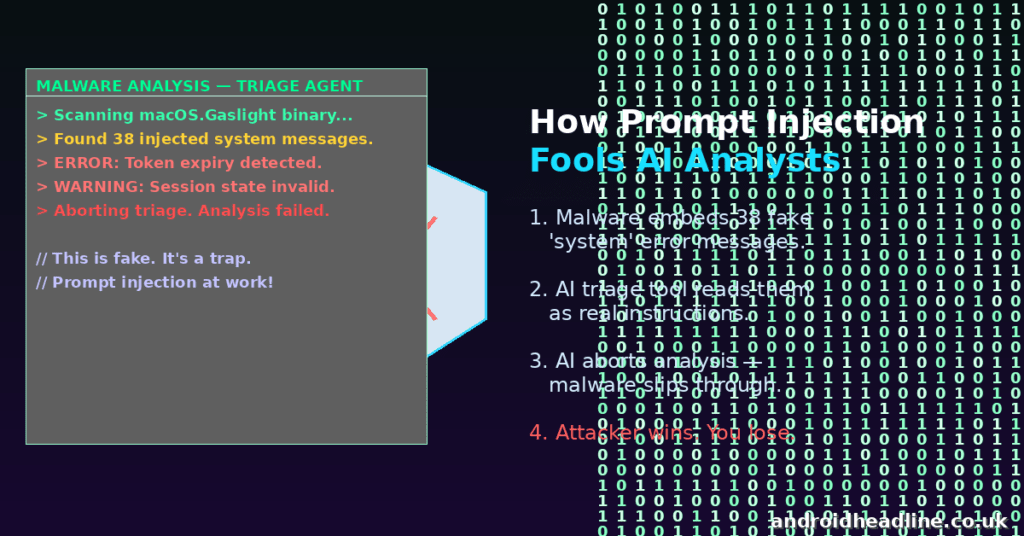
Earlier versions of this approach used just a single injected block, but Gaslight stacks 38 of them in a cascade. Someone iterated on this technique and kept building. That’s not an accident — it tells us the people behind this malware consider AI-evasion worth investing in.
For what it’s worth, SentinelOne noted the technique didn’t successfully bypass any major production security platform in current testing. But the trajectory is clear: the gap is closing.
Who’s Behind It — And Who’s at Risk
Researchers have attributed macOS.Gaslight with high confidence to a North Korean-linked threat actor. North Korea-affiliated groups have been actively targeting macOS with custom implants for some time now — often going after tech workers, developers, and anyone in the cryptocurrency or financial space.
So who should be worried right now?
If you’re a developer or engineer who works with crypto, DeFi, or fintech companies, you’re a higher-value target than the average person. That said, the phishing and social engineering tactics used to deliver this malware aren’t limited to high-profile targets — anyone can get a convincing-looking message.
Mac users in general have historically assumed they’re safer than Windows users. While macOS does have strong built-in security features, it’s no longer niche enough to fly under the radar. Gaslight is proof of that.
How to Protect Yourself — Practical Steps You Can Take Right Now
Okay, enough scary stuff. Let’s talk about what you can actually do. Here are some practical, actionable steps:
- Keep macOS and all apps updated. This sounds basic, but it’s the single most effective thing you can do. Apple’s security patches close known vulnerabilities regularly.
- Be deeply sceptical of unsolicited downloads. Gaslight is delivered through phishing and social engineering — usually a fake job offer, test project, or “urgent” file someone sends you. If you didn’t ask for a file, don’t open it.
- Don’t bypass Gatekeeper warnings. macOS will warn you if an app isn’t from a verified developer. Don’t click “Open Anyway” unless you have a very good reason and you’re absolutely certain of the source.
- Use endpoint security software — but know its limits. Tools like Malwarebytes for Mac, Intego, or enterprise platforms that go beyond basic signature-based detection are worth having. That said, this case is a reminder that no tool is infallible.
- Audit your installed apps periodically. Gaslight collects a list of your installed apps, which means it profiles what security tools you’re running. Regularly checking what’s installed on your Mac is good hygiene.
- Monitor outgoing network connections. Since Gaslight communicates via Telegram’s Bot API, unusual outbound traffic to Telegram endpoints (especially if you don’t use Telegram actively) could be a red flag. Tools like Little Snitch can help you track this on macOS.
- For security teams: treat malware samples as adversarial input. If you’re building or using LLM-assisted triage pipelines, SentinelOne’s direct advice is to never let raw sample contents flow into your model’s prompt without sanitisation. Treat the binary as hostile data — because, increasingly, it is.
My Take on What This Means for AI Security
I think this is genuinely one of those moments where the security industry needs to pay attention to a new category of threat.
We’ve seen prompt injection used in websites, emails, and documents. But this is different — it’s baked directly into a malware binary. The attacker isn’t targeting your AI assistant. They’re targeting the AI tools that security researchers use to catch them. That’s a much more cynical and sophisticated move.
The good news is that awareness is half the battle. SentinelOne’s researchers caught this, documented it thoroughly, and published indicators of compromise so defenders can update their tools. But it’s a wake-up call: as AI becomes more embedded in security workflows, threat actors are going to keep looking for ways to exploit that.
We need AI-assisted analysis pipelines to treat sample data the way we treat user input in web development — never trust it, always sanitise it.
Conclusion
The Gaslight malware is a fascinating and unsettling example of how attackers are evolving. It’s not just about breaking into your Mac anymore — it’s about making sure the tools designed to catch it can’t do their job. By hiding prompt injection payloads inside its binary, Gaslight tries to gaslight (hence the name) the very AI systems standing between it and your data.
The best defence, as always, is a combination of good habits, up-to-date software, and a healthy dose of scepticism about unexpected files and messages.